
Claude Code Architecture
2026-08-14 · Claude Code 2.1.226
Claude Code's architecture makes more sense as "LLM + a fairly sophisticated agent runtime" than as "LLM + terminal".
Anthropic describes Claude Code as the agentic harness around Claude: the model does the reasoning, and the harness supplies tools, context management, execution, permissions, and the loop that lets the model act and observe over and over. (Claude)
There is also unusually good visibility into the implementation. In March 2026, an npm source-map exposure revealed a large portion of the TypeScript CLI implementation, reported as roughly 1,900 files and 512k lines. The exact internal structure should not be treated as a stable public API. (claude-harness.dev)
1. The architecture at a high level
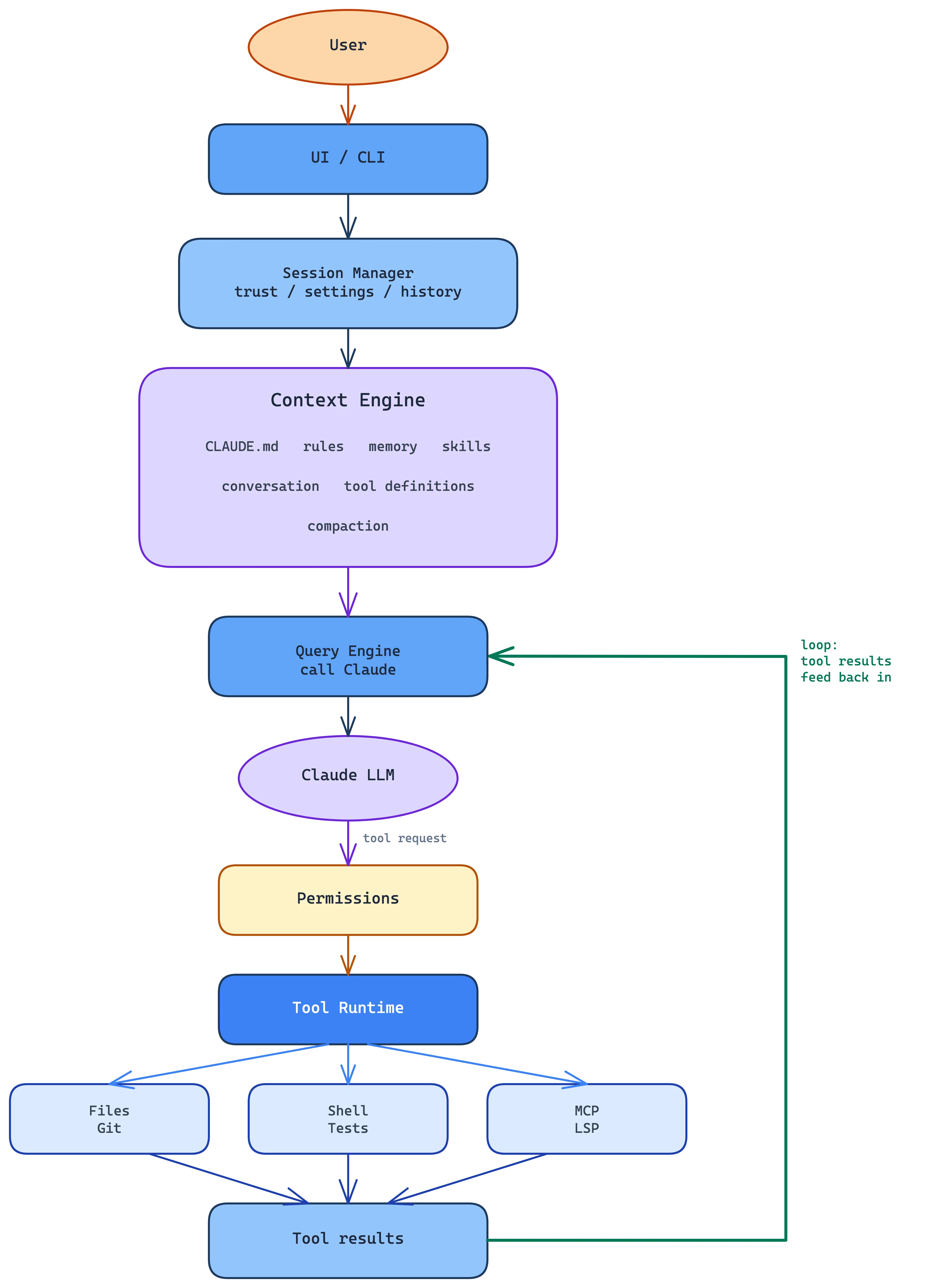
I'd model it roughly like this:
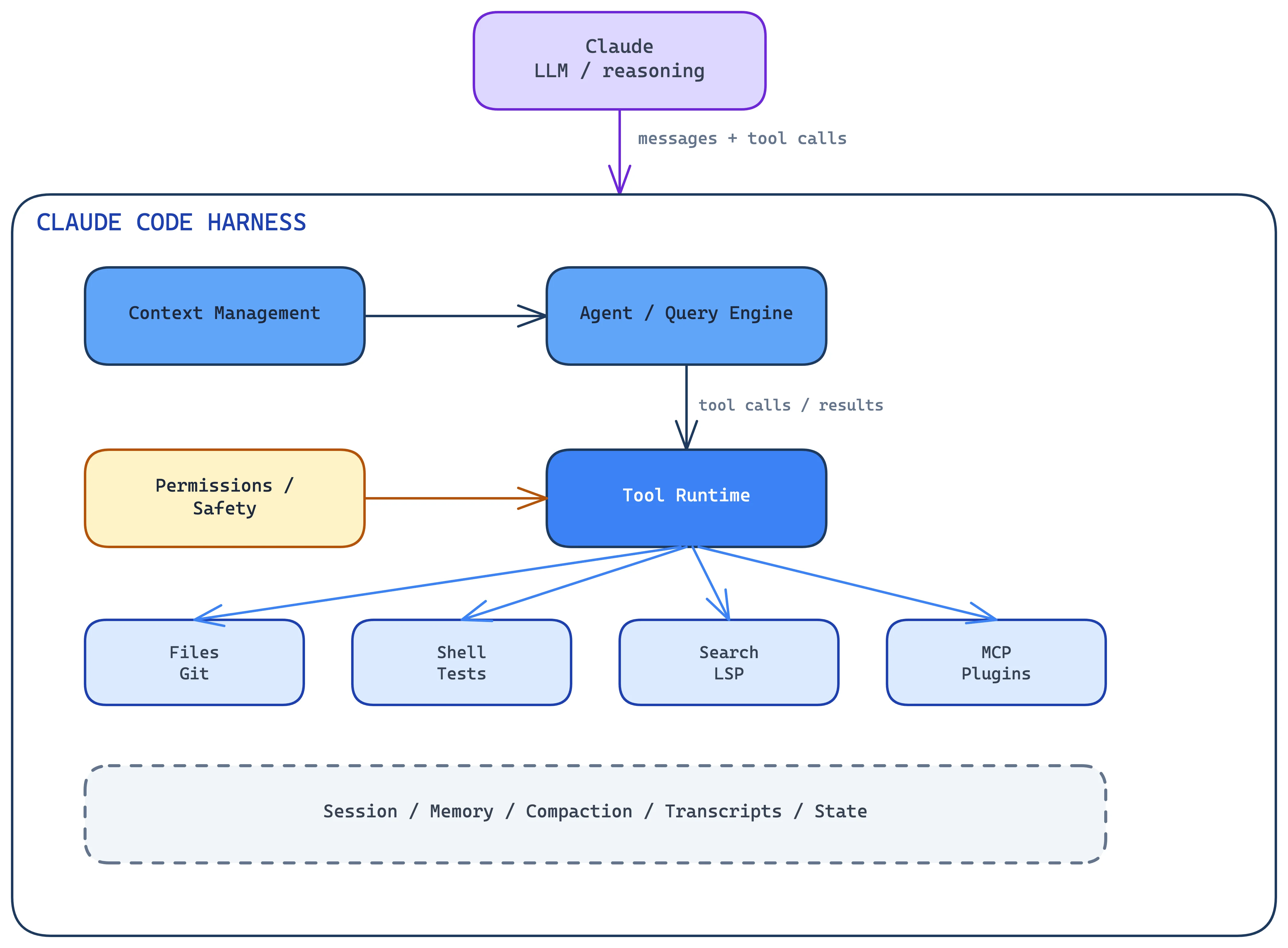
The model isn't operating the computer directly. It produces structured requests; the harness decides what those requests mean, whether they're allowed, executes them, feeds the results back to the model, and repeats.
2. The central agent loop
At the center is a simple loop:
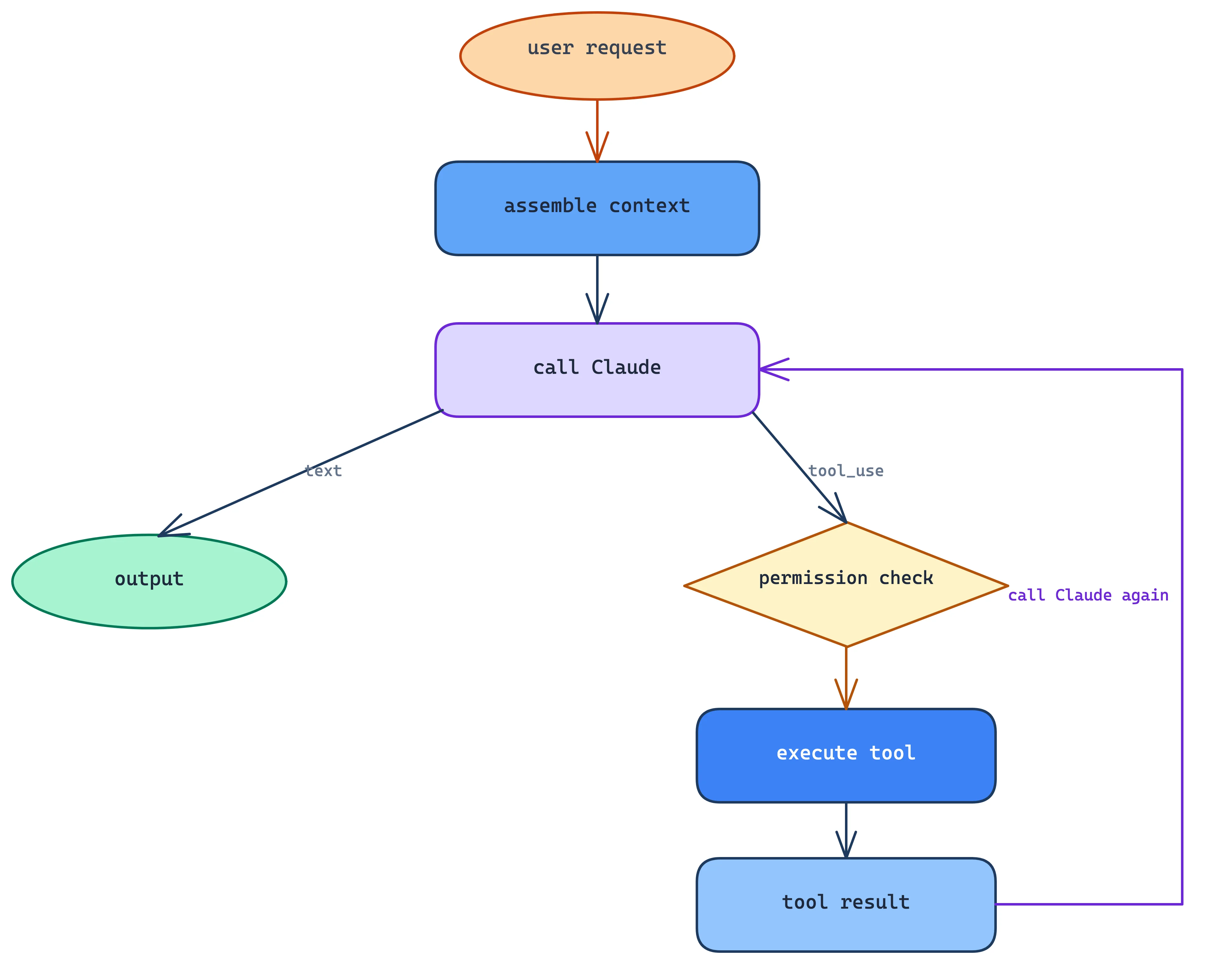
The official documentation describes essentially this gather → act → verify cycle. (Claude)
The implementation exposed in the source-map splits this up clearly:
QueryEngine: session and conversation statequery(): the streaming agent loop- API client: communication with Claude
- Tool registry: available capabilities
- Tool executor: runs them
The reported implementation has QueryEngine.ts at roughly 1,295 lines and query.ts around 1,729 lines. A lot of complexity collects around a loop that is otherwise trivial. (claude-harness.dev)
3. Context engineering is a major part of the harness
Of everything here, this is the part I'd want someone to take away. Claude Code doesn't simply send:
"user: fix this bug"
Instead it builds a working context out of many sources:
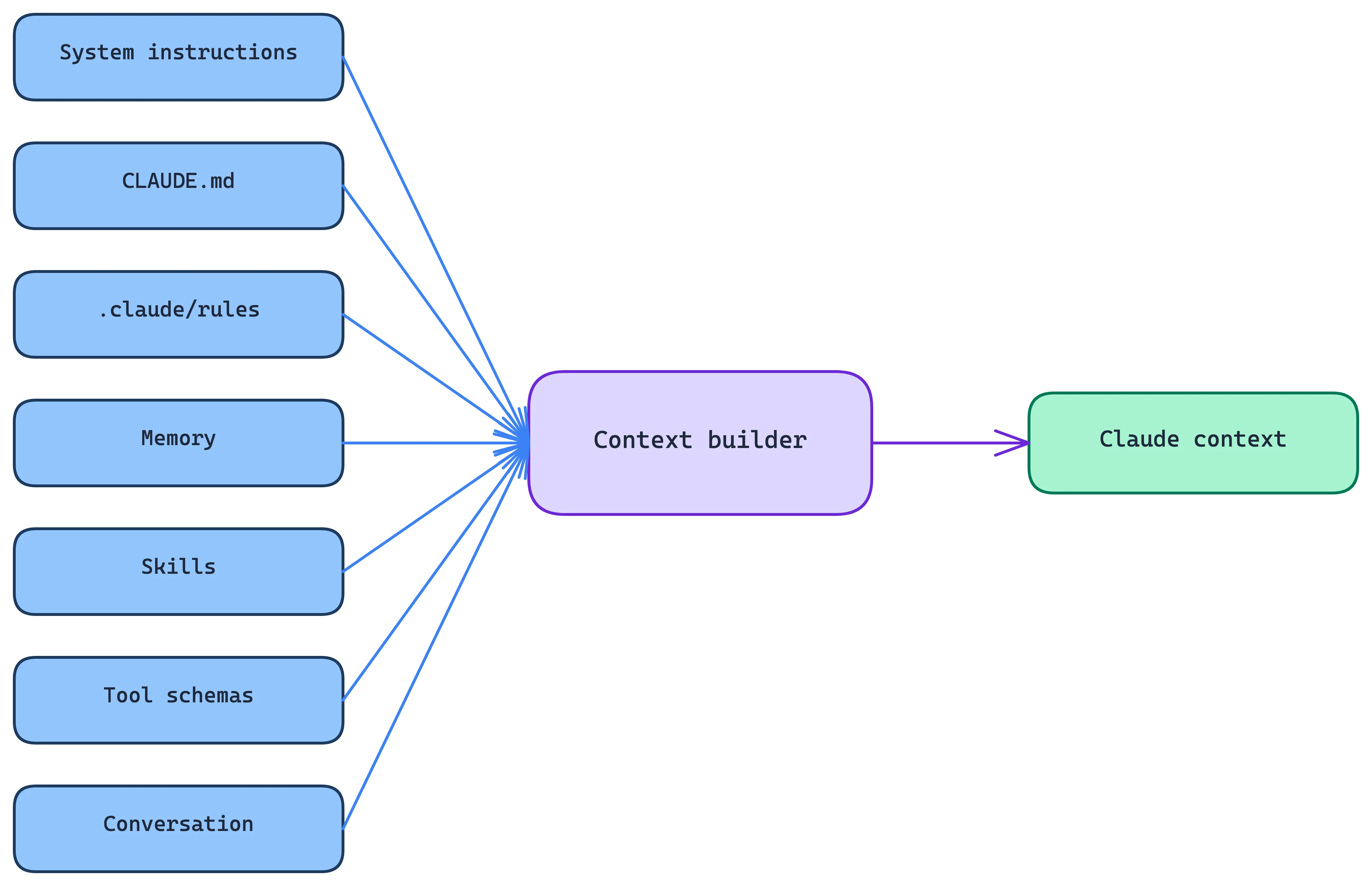
Current Claude Code documentation describes project instructions, rules, memory, skills, MCP tools, conversation history, file reads, tool outputs and compaction as parts of this working context. (AgentWay)
That's why context management is a subsystem in its own right and not just prompt construction.
4. Tools are the computer interface
Claude itself has no inherent ability to:
- read a file
- modify a file
- run
npm test - execute
git - search a repository
- inspect diagnostics
- talk to Jira
- query a database
The harness exposes those capabilities as tools.
Conceptually:
type Tool = {
    name: string
    description: string
    inputSchema: Schema

    execute(
        input: unknown,
        context: ToolContext
    ): Promise<ToolResult>
}
The model sees something resembling:
Tools available:

ReadFile(path)
EditFile(...)
Bash(command)
Search(...)
...
It then generates:
{
  "tool": "Bash",
  "input": {
    "command": "npm test"
  }
}
The harness takes over.
The source analysis identifies a central Tool.ts type system, a tool registry, and dozens of concrete tool implementations. (claude-harness.dev)
An important distinction
Tools are not the agent. They're closer to the agent's syscalls.
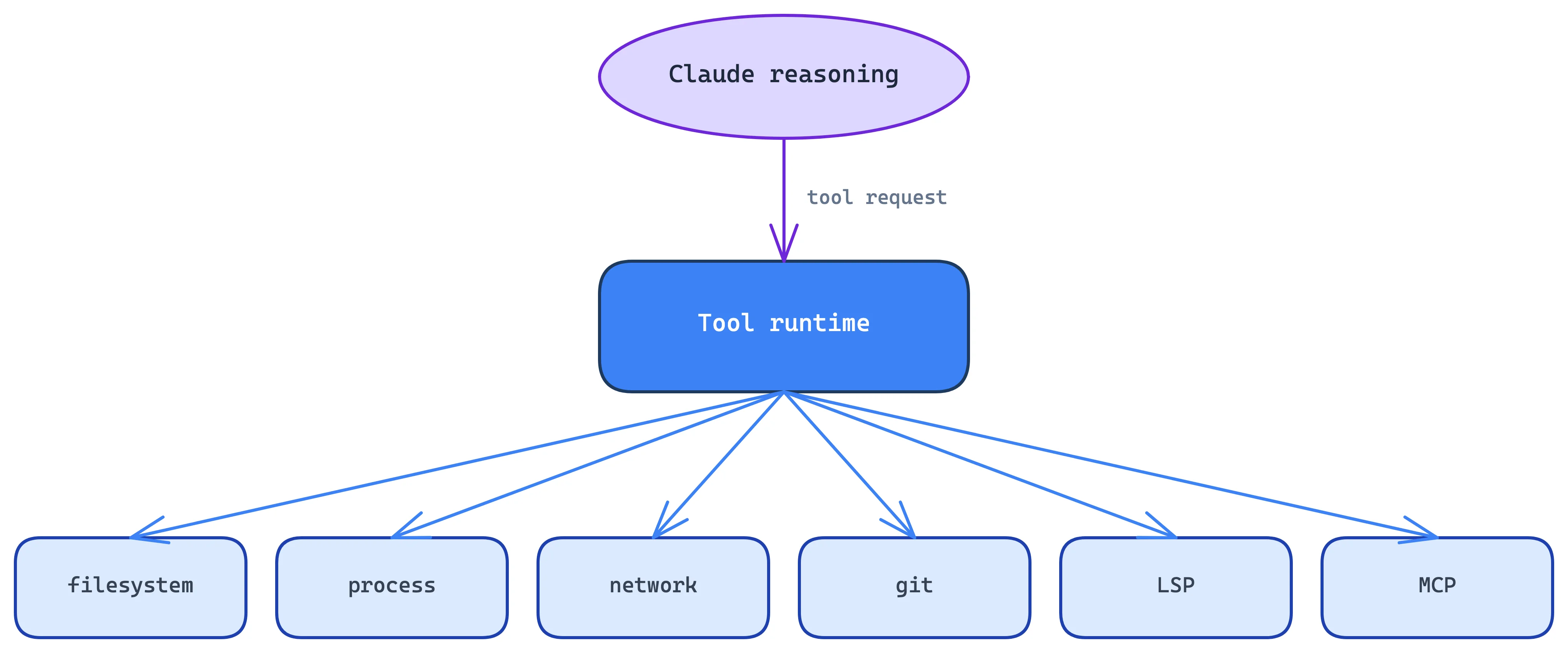
That separation is a big part of what makes a harness possible.
5. Permissions sit between reasoning and execution
The model can request:
rm -rf ...
but that doesn't mean Claude Code necessarily executes it.
The flow is more like:
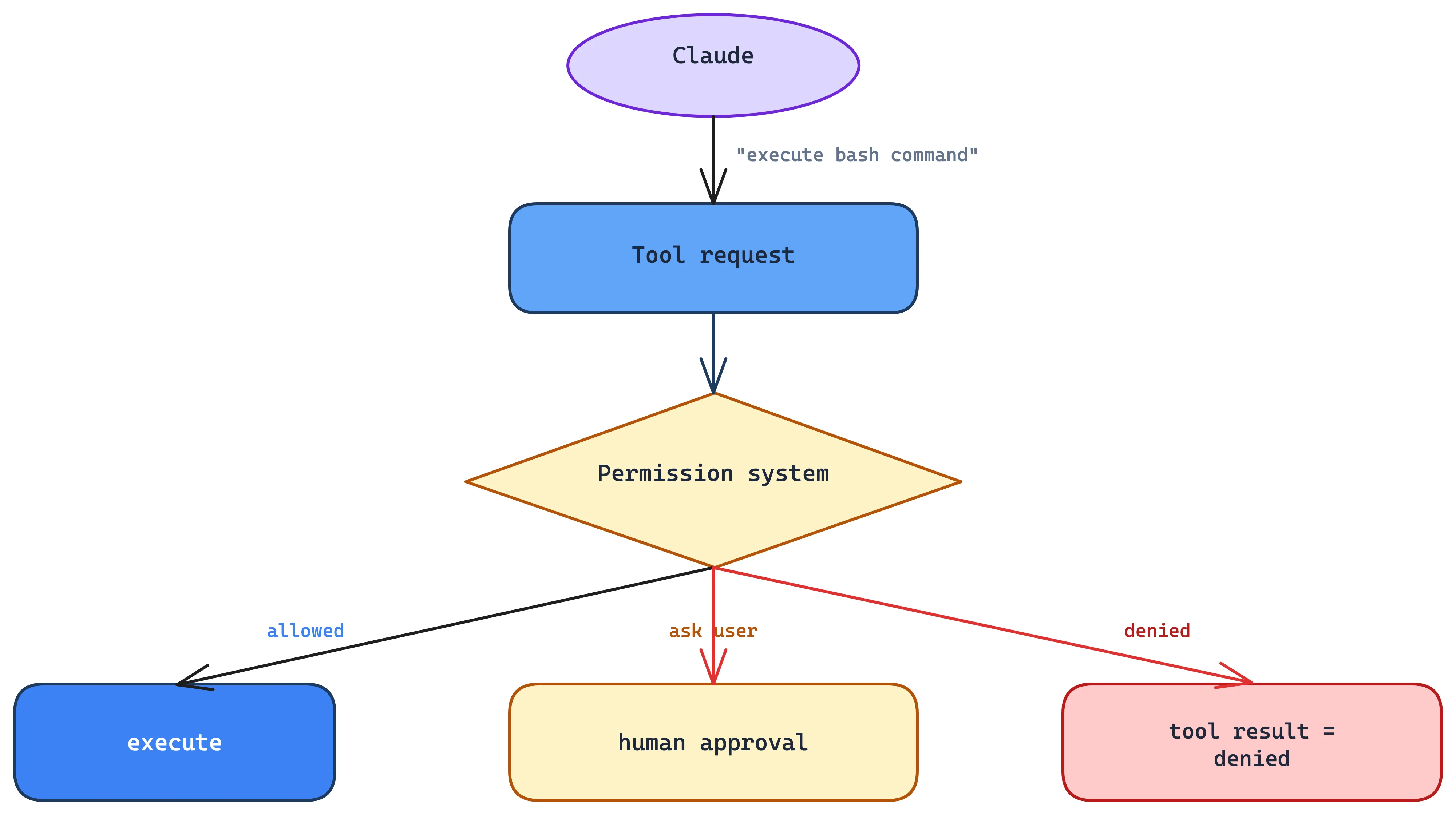
The permission model is part of the agent control plane. Current Claude Code has several permission modes plus workspace-trust and configuration mechanisms. (AgentWay)
This is one reason I wouldn't call Claude Code an "LLM wrapper." The harness enforces the boundary between what Claude wants to do and what the computer actually permits.
6. Context compaction is effectively garbage collection
Long-running agents have a fundamental problem:
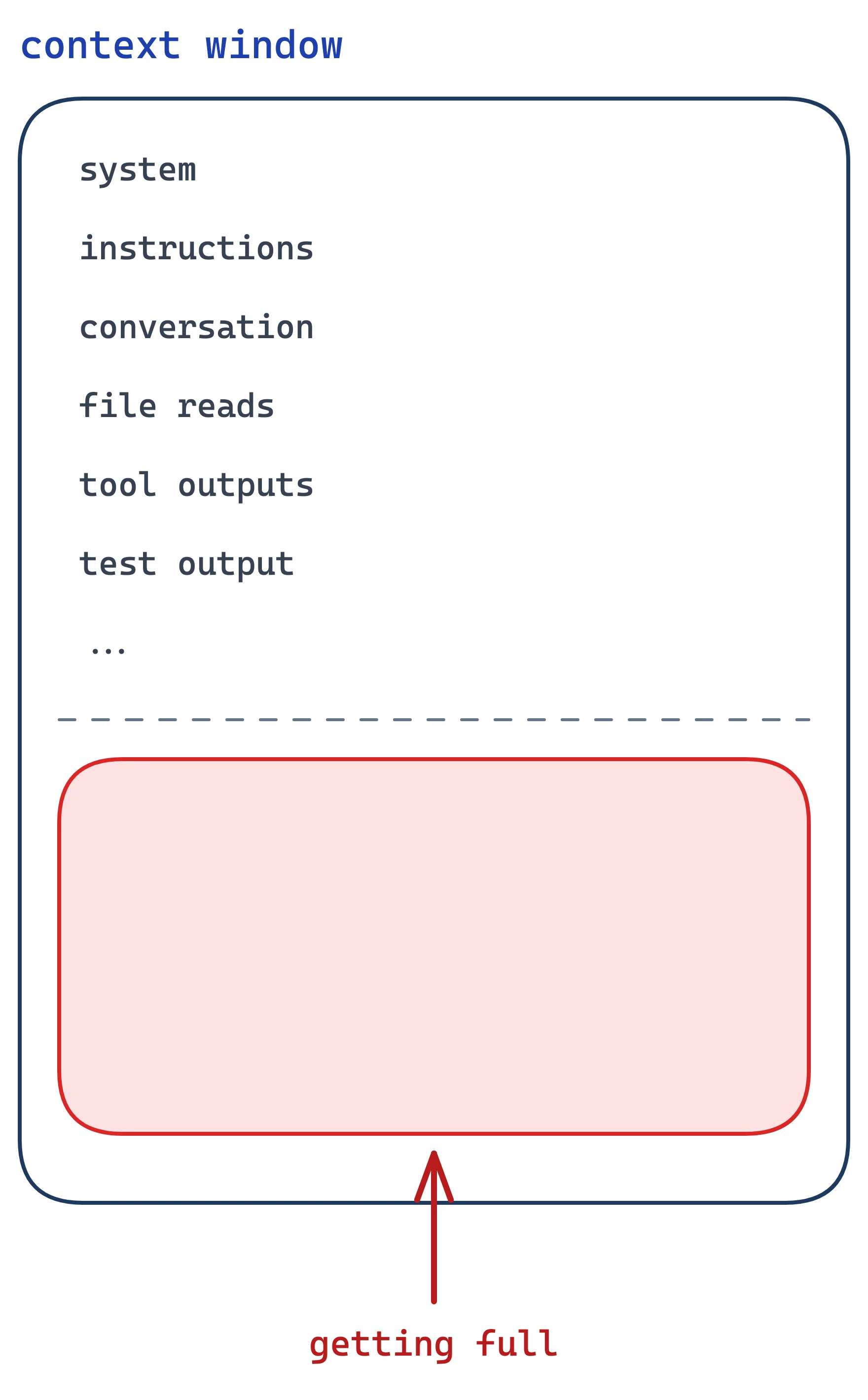
Claude Code therefore needs to decide:
What information should survive?
It can compact the conversation into a smaller representation:

This is a large part of why a coding agent can work for hours instead of behaving like a chatbot with a fixed conversation window.
A research analysis of Claude Code's architecture identifies context compaction as a multi-stage pipeline, alongside the permission system and the agent loop. (arXiv)
7. Memory is separate from conversation history
Another useful distinction:
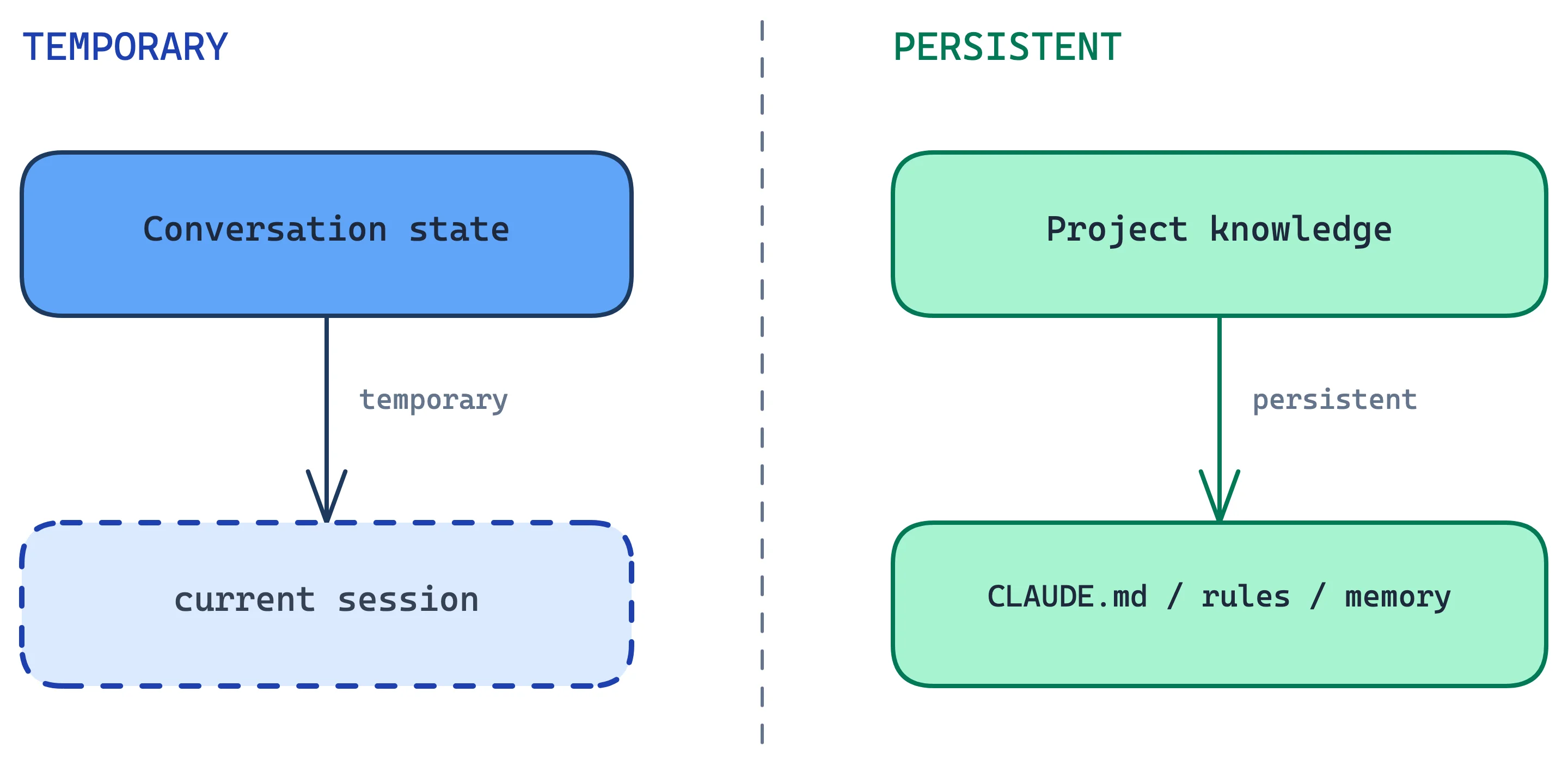
For example:
CLAUDE.md

- Use pnpm
- PostgreSQL is the database
- Don't use ORM X
- Run `pnpm test`
- API follows REST conventions
That isn't chat memory. It's environment configuration, knowledge injected into the agent.
Claude Code also has auto-memory mechanisms that preserve useful discoveries across sessions. (AgentWay)
8. Skills are lazy-loaded agent capabilities
Skills exist so you don't have to stuff every possible procedure into the system prompt:
Here's how to deploy...
Here's how to review PRs...
Here's how to migrate DB...
Here's how to write release notes...
...
Claude can have a catalogue of skills and load the detailed instructions when needed.
Conceptually:
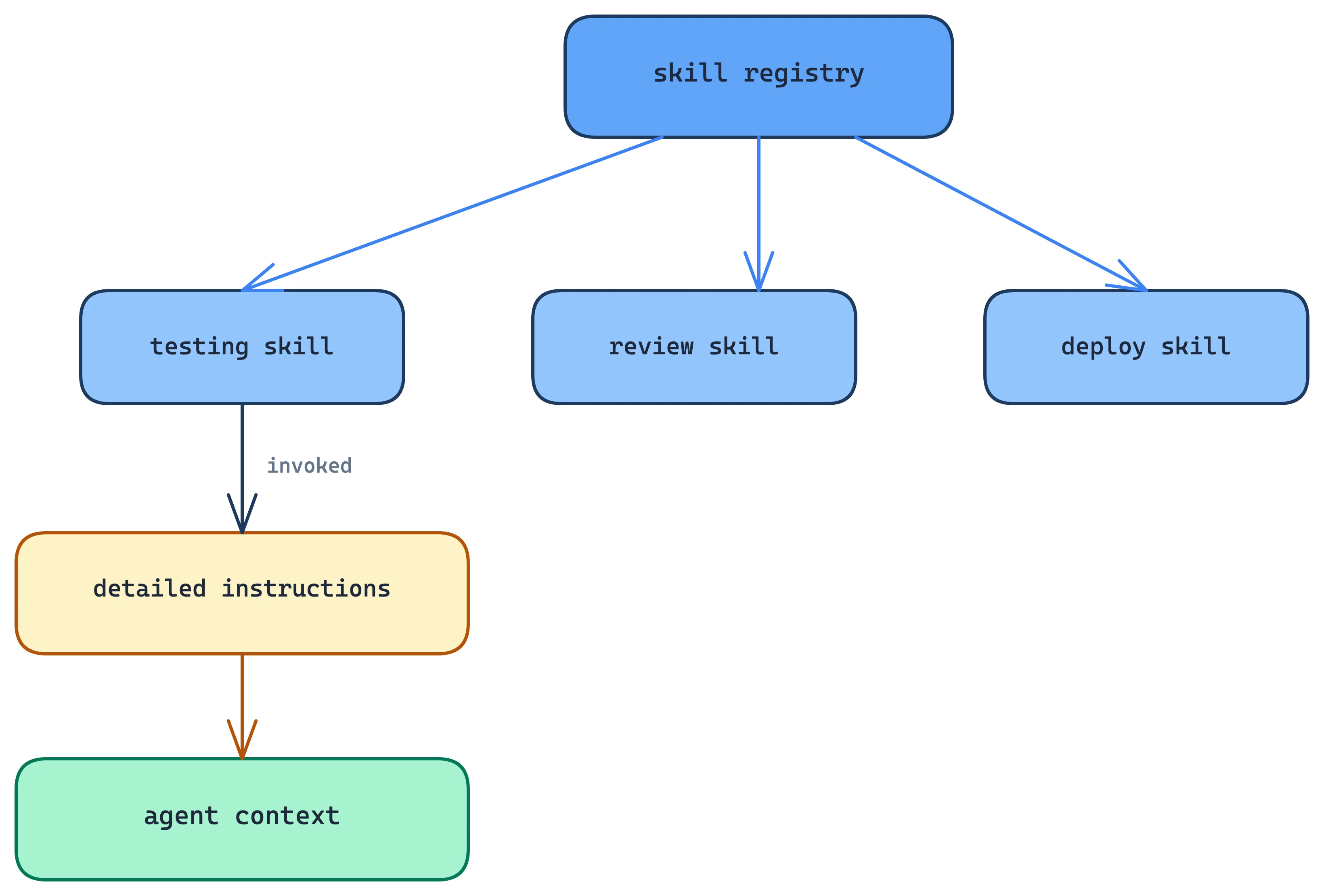
It's lazy-loading for context.
Claude Code's documentation describes skills as reusable workflows, and the current architecture documentation notes that skill descriptions can be available up front while their full bodies stay deferred until invocation. (Claude)
9. MCP is an extension boundary
MCP sits outside the core tool runtime:
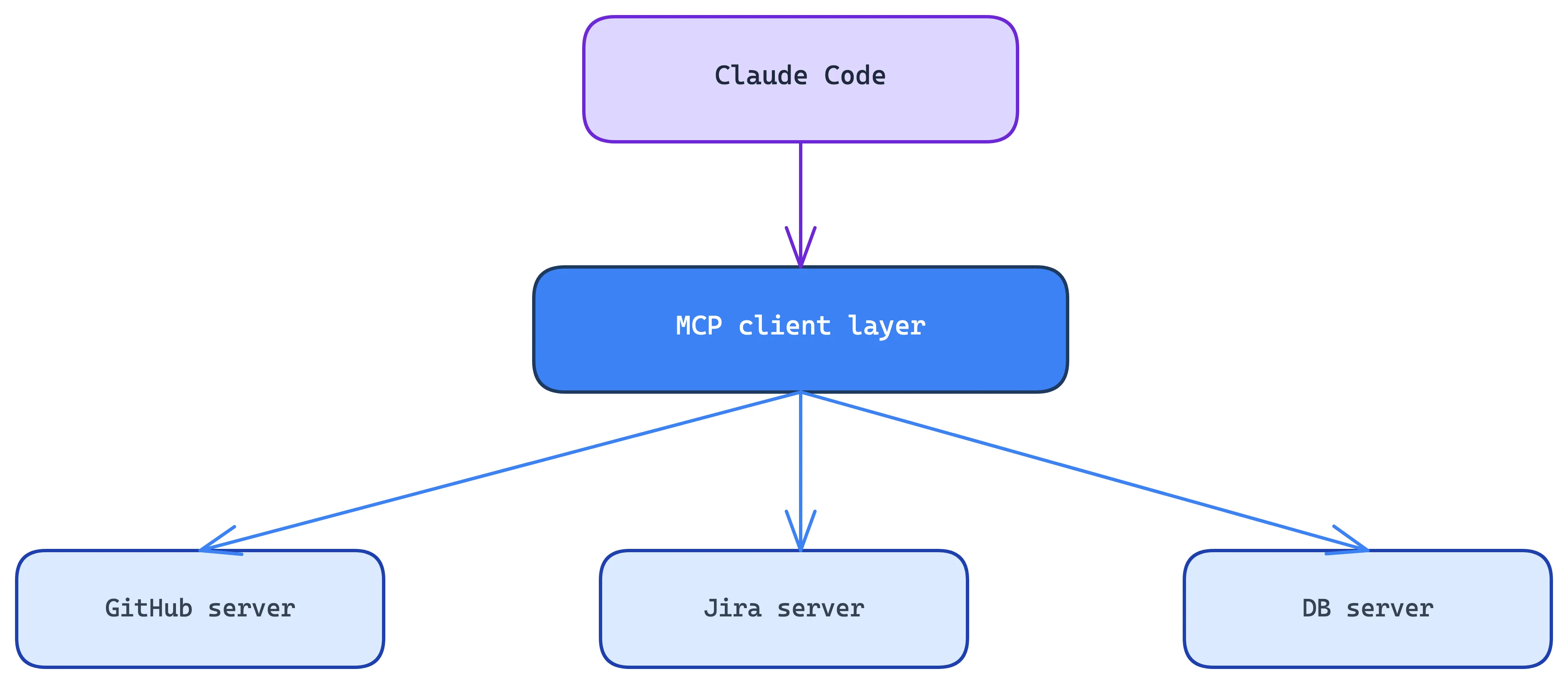
That matters because Anthropic doesn't have to hard-code every integration.
The harness only needs to understand:

The actual capability lives elsewhere.
Anthropic explicitly positions MCP as the mechanism for connecting Claude Code to external systems such as documentation, Jira, Slack and custom tooling. (Claude)
10. Hooks are deliberately not agentic
Hooks are the interesting contrast with tools.
A tool is:
A hook is:
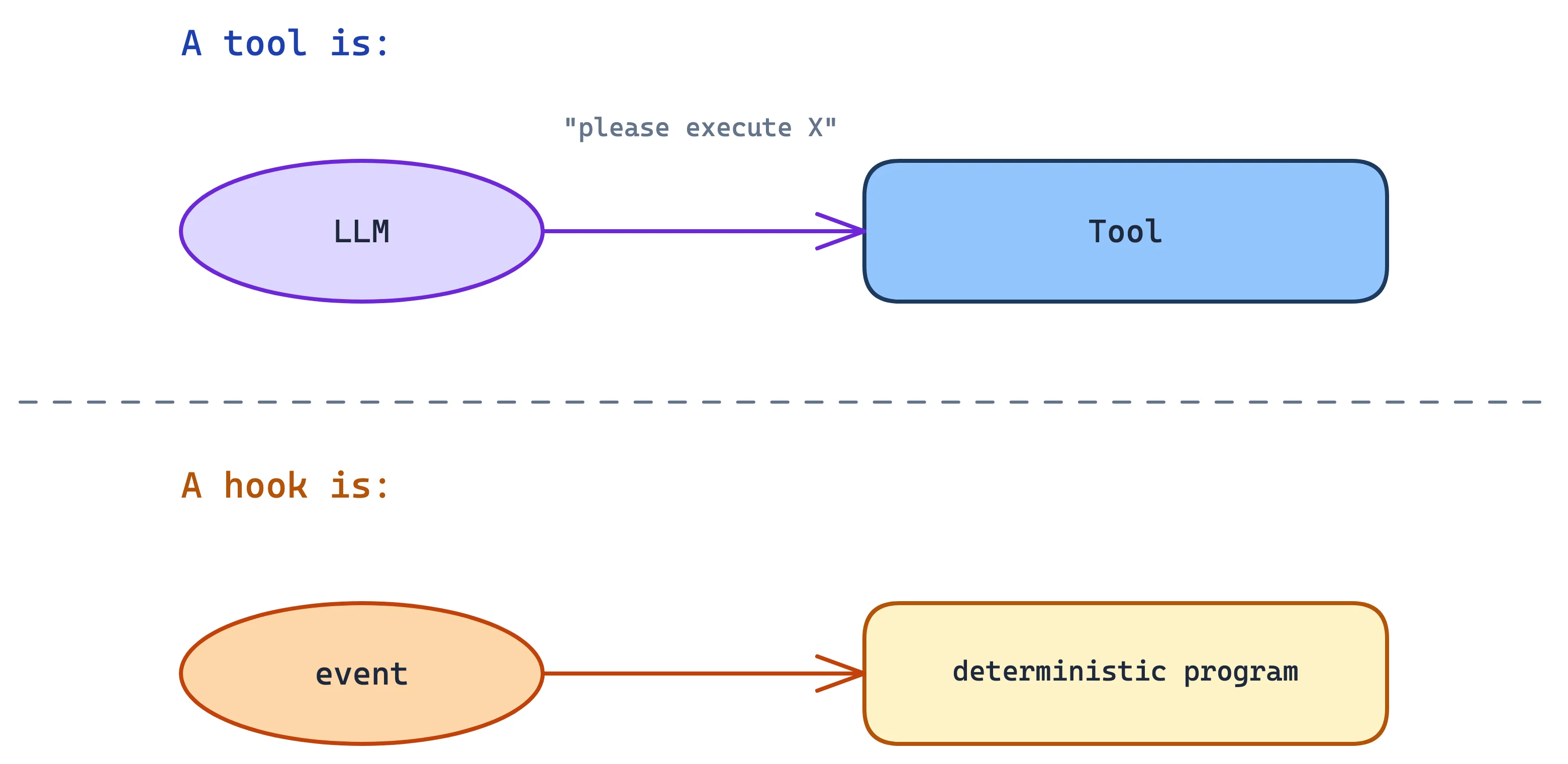
For example:

Or:
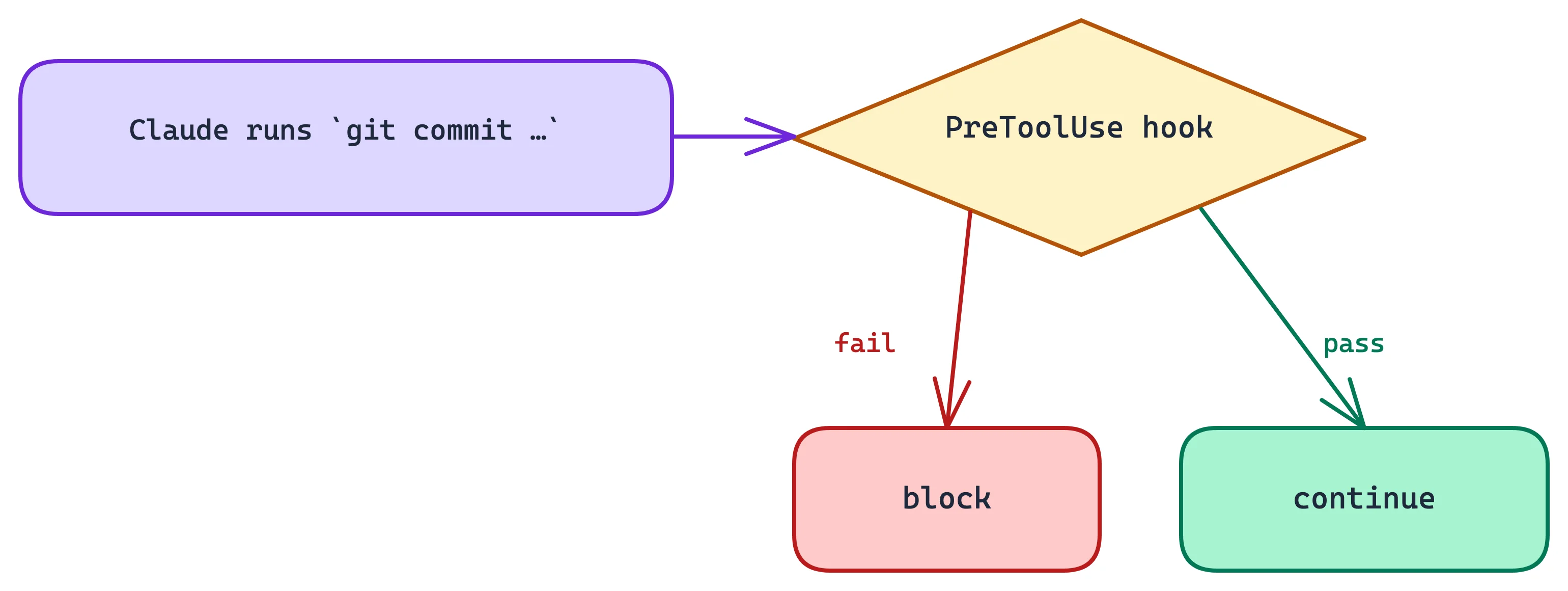
Hooks fire on harness lifecycle events (PreToolUse, PostToolUse, UserPromptSubmit, SessionStart, Stop, SubagentStop, PreCompact, Notification), not on git or editor events. So "lint before commit" is a PreToolUse matcher on Bash commands matching git commit, not a commit event of its own. Despite the surface resemblance, this is a different mechanism from git hooks.
That matters for reliability. You don't want the model deciding whether certain safety checks happen, so you encode them outside the model.
One nuance on "not agentic": hooks are deterministic in when they fire, but they aren't isolated from the agent. Their output goes back into the model's context, and a blocking hook returns text the model reads and reacts to. A SessionStart hook can inject an entire behavioral spec before the first turn.
11. Subagents solve context isolation
Suppose Claude is asked:
Investigate why our authentication tests are flaky.
It might need to read 100 files, and putting all of that into the main context is expensive.
Instead:
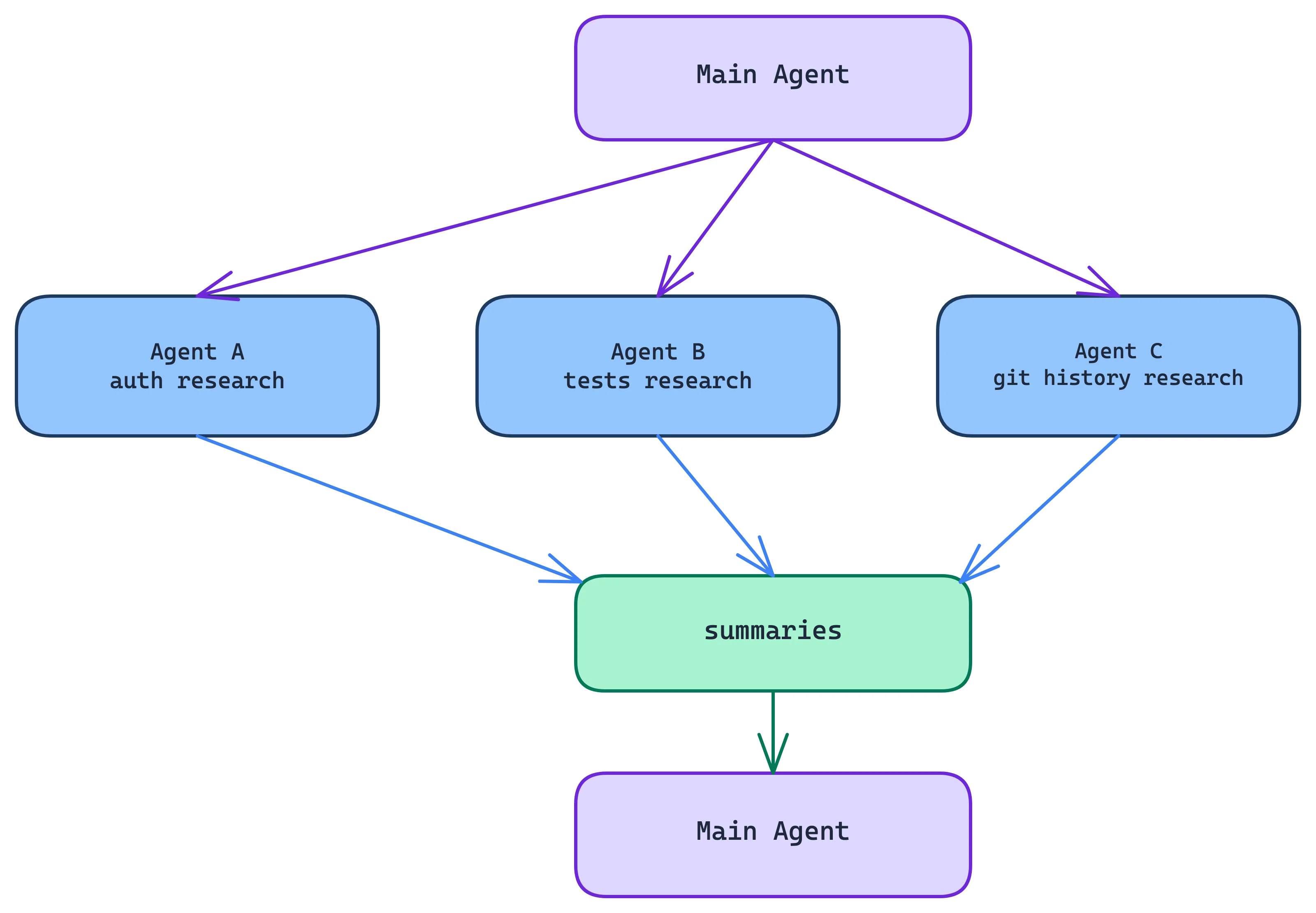
The main benefit is context isolation rather than parallelism.
The subagent can accumulate 50k tokens of noisy exploration and return:
I found the problem:
AuthFixture is shared between tests.
The race occurs in ...
rather than polluting the parent context with all 50k tokens.
Claude Code now has several forms of parallel work, including subagents, worktree-based sessions and agent teams. (AgentWay)
12. Worktrees solve a different problem
Subagents answer the question "how do I isolate context?" Git worktrees answer "how do I isolate files?"
For example:
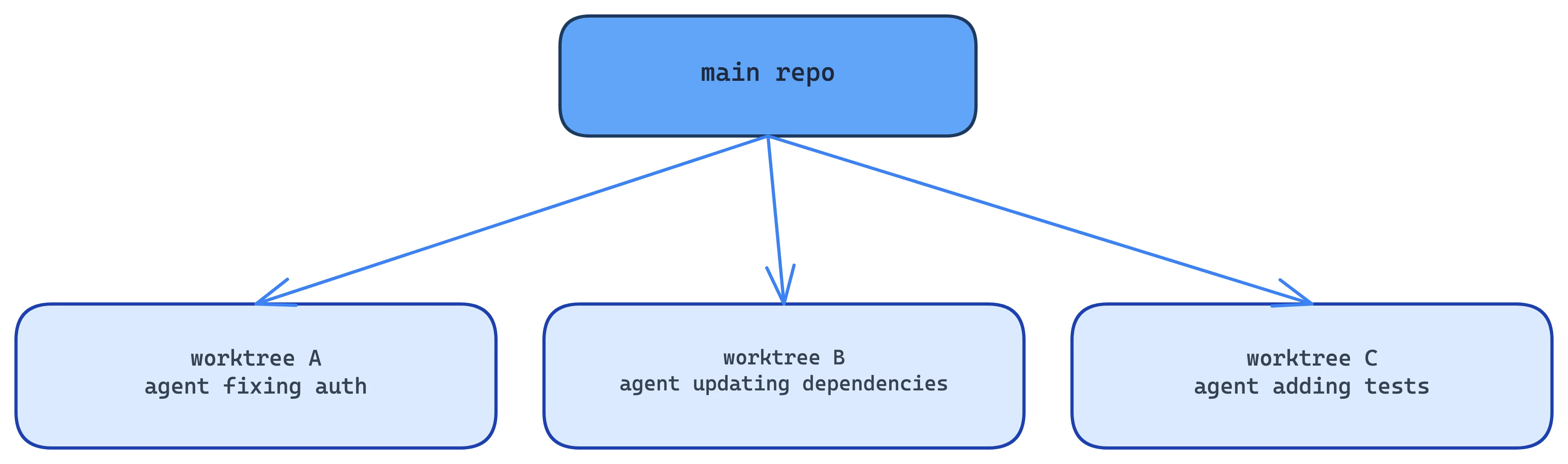
Each agent gets its own filesystem and branch. The separation of concerns falls out cleanly:
| Problem | Mechanism |
|---|---|
| Context isolation | Subagents |
| Filesystem isolation | Worktrees |
| External-system isolation | MCP |
| Deterministic enforcement | Hooks |
| Persistent knowledge | Memory / CLAUDE.md |
| Capability packaging | Skills |
| Permission boundary | Permission system |
13. Session persistence is another major subsystem
A Claude Code session isn't simply:
POST /messages
There is persistent state around it.
Conceptually:
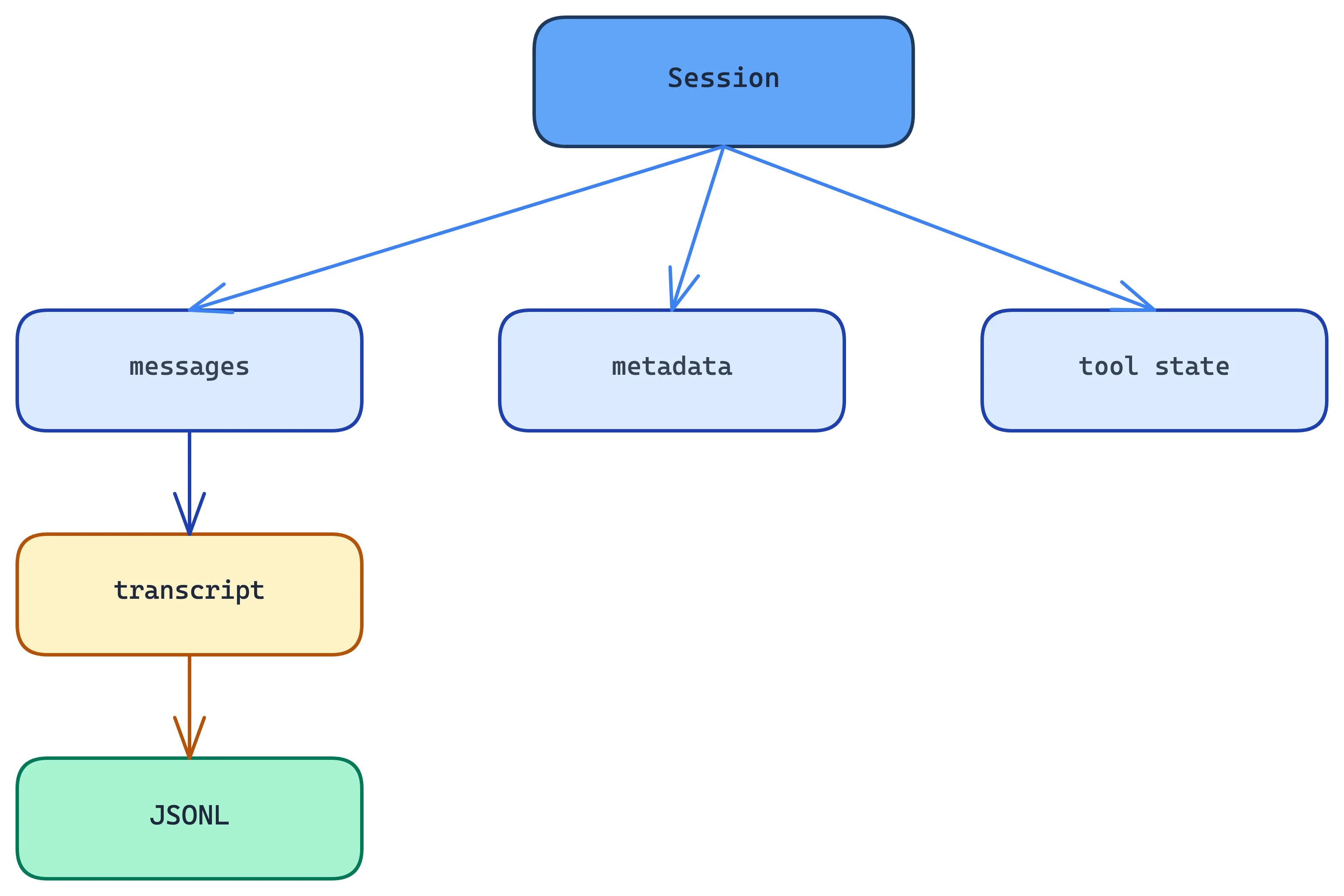
This allows things like:

Current architecture documentation describes local JSONL session transcripts and commands for inspecting runtime/context state. (AgentWay)
14. The UI is actually another layer
The CLI itself is a fairly sophisticated application. The source analysis reports:
- Bun runtime
- TypeScript
- React + Ink for terminal UI
- Commander.js for CLI parsing
- Zod for schemas
- ripgrep for code search
- Anthropic SDK
- MCP SDK
- LSP
- OpenTelemetry/gRPC infrastructure (claude-harness.dev)
The React/Ink choice makes sense once you notice Claude Code's terminal isn't a conventional CLI anymore. It needs:
streaming text
tool progress
diff rendering
permission dialogs
interactive input
status indicators
multiple agents
etc.
That's a GUI application rendered into a terminal.
15. Putting everything together
A more complete mental model is:
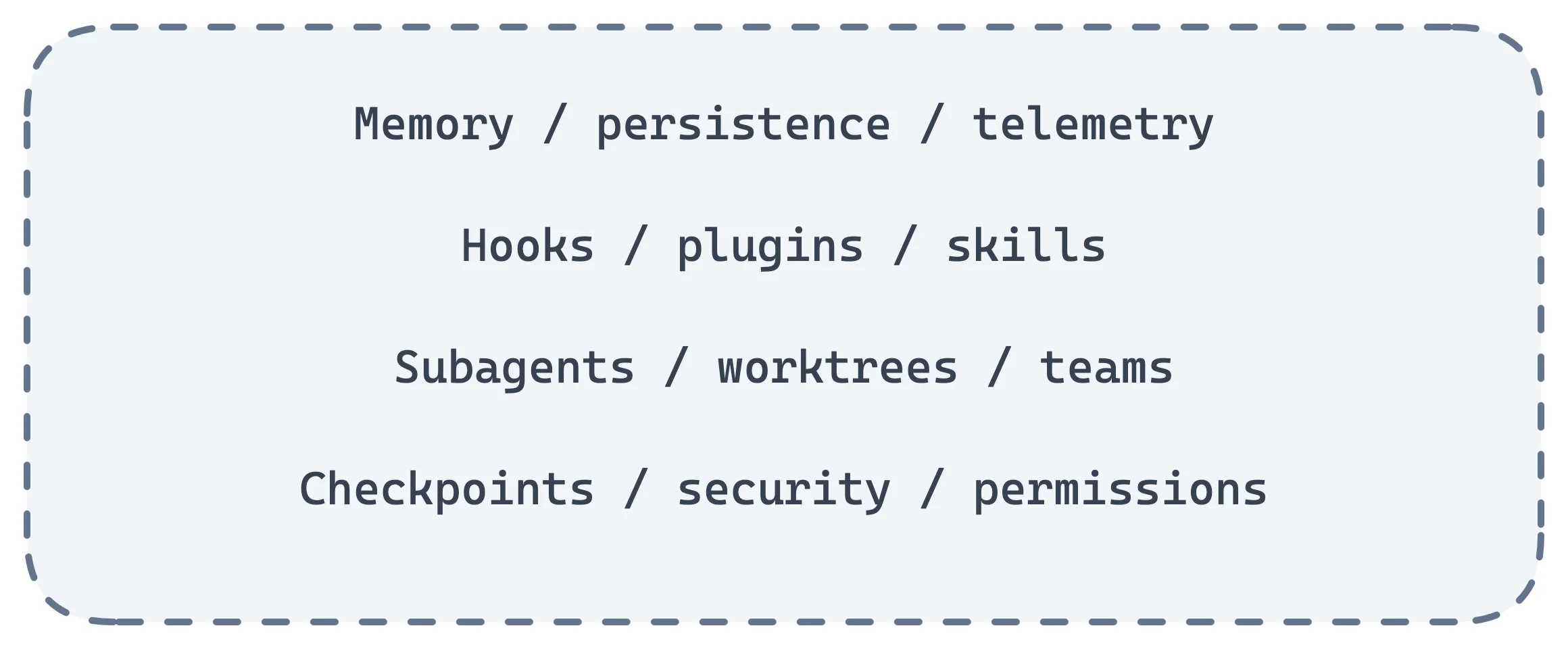
And around all of this:
Where the difficulty actually lives
If you want to build something similar, the model is the least interesting component. The core is approximately:
while (!done) {
    context = buildContext(state)

    response = await model(context, tools)

    if (response.isText()) {
        output(response)
    }

    for (const call of response.toolCalls) {
        checkPermission(call)
        result = await execute(call)
        state.add(result)
    }

    state = maybeCompact(state)
}
That's the skeleton. The engineering difficulty comes from everything wrapped around it:
context selection → tool abstraction → permissions → execution → recovery → persistence → compaction → parallelism → extensibility → observability.
That's why "harness" is a useful word. Anthropic's own description amounts to the same thing: Claude Code provides the tools, context management and execution environment that turn Claude into a coding agent. (Claude)
It also explains why modern coding-agent architectures keep converging on the same shape, a fairly simple model/tool loop surrounded by a large control plane. A recent academic analysis of Claude Code names the permission system, the context-compaction pipeline, MCP/skills/hooks/plugins, subagent delegation and append-oriented session storage as its major components. (arXiv)
See also
Building an equivalent harness decomposes into roughly ten modules: AgentLoop, ContextManager, ToolRegistry, PermissionManager, SessionStore, Compactor, SubagentRunner, and the interfaces between them. Not yet written up here.
Not covered above, worth adding: plan mode, headless/SDK mode (claude -p) as an architectural surface, checkpoints/rewind, and deferred tool schemas (the §8 lazy-loading idea applied to tool definitions rather than skills).